
4.3 KiB
4.3 KiB
WASM Compatibility Guide for socktop_connector
This directory contains a complete WebAssembly (WASM) compatibility test and implementation guide for the socktop_connector library.
Overview
socktop_connector provides full WebSocket networking support for WebAssembly environments. The library includes complete connectivity functionality with automatic compression and protobuf decoding, making it easy to connect to socktop agents directly from browser applications.
What Works in WASM
- ✅ Full WebSocket connections (
ws://connections) - ✅ All request types (
AgentRequest::Metrics,AgentRequest::Disks,AgentRequest::Processes) - ✅ Automatic data processing: Gzip decompression for metrics/disks, protobuf decoding for processes
- ✅ Configuration types (
ConnectorConfig) - ✅ Request/Response types (
AgentRequest,AgentResponse) - ✅ JSON serialization/deserialization of all types
- ✅ Protocol and version configuration builders
- ✅ All type-safe validation and error handling
What Doesn't Work in WASM
- ❌ TLS connections (
wss://) - usews://only - ❌ TLS certificate handling (use non-TLS endpoints)
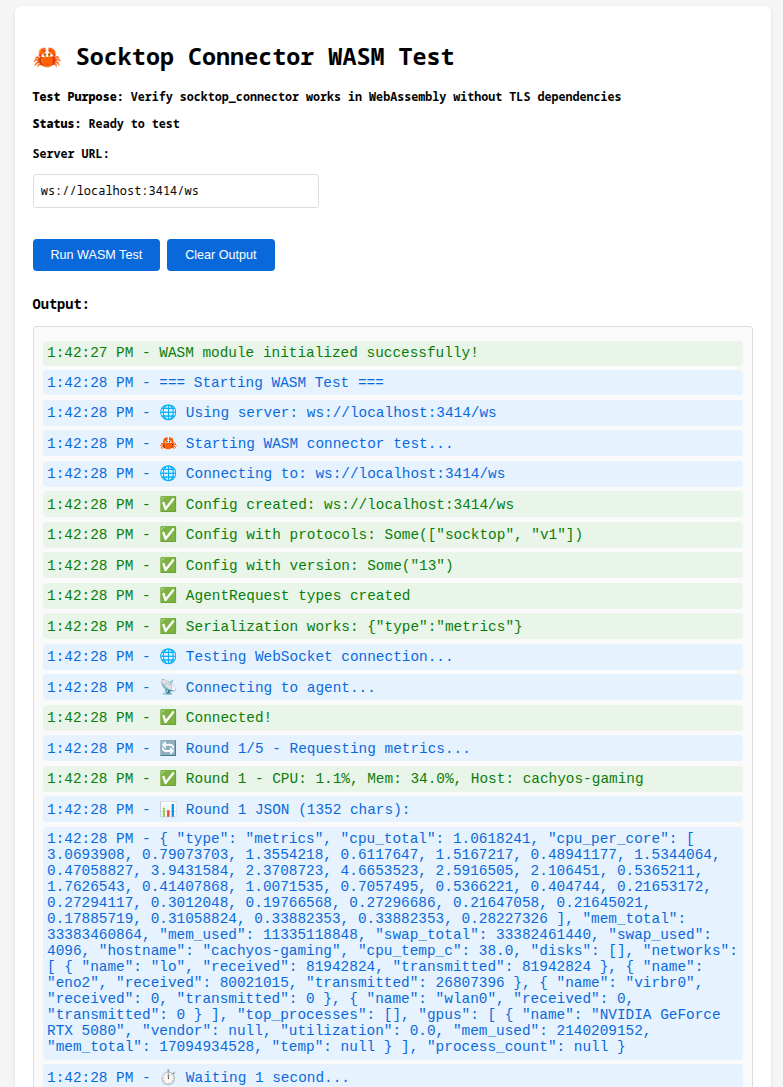
Quick Start - WASM Test Page
# Please note that the test assumes you have and agent runnign on your local host at port 3000. If you would like to use an alternate configuration please update lib.rs prior to build.

# Build the WASM package
wasm-pack build --target web --out-dir pkg

# Serve the test page
basic-http-server . --addr 127.0.0.1:8000

# Open http://127.0.0.1:8000 in your browser
# Check the browser console for test results
WASM Dependencies
The test uses the WASM-compatible networking features:
[dependencies]
socktop_connector = { version = "0.1.5", default-features = false, features = ["wasm"] }
serde = { version = "1.0", features = ["derive"] }
serde_json = "1.0"
wasm-bindgen = "0.2"
console_error_panic_hook = "0.1"

[dependencies.web-sys]
version = "0.3"
features = ["console"]
Key: Use features = ["wasm"] to enable full WebSocket networking support in WASM builds.
Implementation Strategy
1. Use socktop_connector Types for Configuration
use wasm_bindgen::prelude::*;
use socktop_connector::{ConnectorConfig, AgentRequest, AgentResponse};

#[wasm_bindgen]
pub fn create_config() -> String {
    // Use socktop_connector types for type-safe configuration
    let config = ConnectorConfig::new("ws://localhost:3000/ws")
        .with_protocols(vec!["socktop".to_string(), "v1".to_string()])
        .with_version("13".to_string());

    // Return JSON for use with browser WebSocket API
    serde_json::to_string(&config).unwrap_or_default()
}
2. Create Type-Safe Requests
#[wasm_bindgen]
pub fn create_metrics_request() -> String {
    let request = AgentRequest::Metrics;
    serde_json::to_string(&request).unwrap_or_default()
}

#[wasm_bindgen]
pub fn create_processes_request() -> String {
    let request = AgentRequest::Processes;
    serde_json::to_string(&request).unwrap_or_default()
}
3. Parse Responses with Type Safety
#[wasm_bindgen]
pub fn parse_metrics_response(json: &str) -> Option<String> {
    match serde_json::from_str::<AgentResponse>(json) {
        Ok(AgentResponse::Metrics(metrics)) => {
            Some(format!("CPU: {}%, Memory: {}MB",
                metrics.cpu_total,
                metrics.mem_used / 1024 / 1024))
        }
        _ => None
    }
}
4. Browser Integration
Then in JavaScript:
import init, {
    create_config,
    create_metrics_request,
    parse_metrics_response
} from './pkg/socktop_wasm_test.js';

async function run() {
    await init();

    // Use type-safe configuration
    const configJson = create_config();
    const config = JSON.parse(configJson);

    // Create WebSocket with proper protocols
    const ws = new WebSocket(config.url, config.ws_protocols);

    ws.onopen = () => {
        // Send type-safe requests
        ws.send(create_metrics_request());
    };

    ws.onmessage = (event) => {
        // Handle responses with type safety
        const result = parse_metrics_response(event.data);
        if (result) {
            console.log(result);
        }
    };
}

run();