 jasonwitty
0859f50897
jasonwitty
0859f50897
Here are concise release notes you can paste into your GitHub release. Release notes — 2025-08-12 Highlights Agent back to near-zero CPU when idle (request-driven, no background samplers). Accurate per-process CPU% via /proc deltas; only top-level processes (threads hidden). TUI: processes pane gets scrollbar, click-to-sort (CPU% or Mem) with indicator, stable total count. Network panes made taller; disks slightly reduced. README revamped: rustup prereqs, crates.io install, update/systemd instructions. Clippy cleanups across agent and client. Agent Reverted precompressed caches and background samplers; WebSocket path is request-driven again. Ensured on-demand gzip for larger replies; no per-request overhead when small. Processes: switched to refresh_processes_specifics with ProcessRefreshKind::everything().without_tasks() to exclude threads. Per-process CPU% now computed from /proc jiffies deltas using a small ProcCpuTracker (fixes “always 0%”/scaling issues). Optional metrics and light caching: CPU temp and GPU metrics gated by env (SOCKTOP_AGENT_TEMP=0, SOCKTOP_AGENT_GPU=0). Tiny TTL caches via once_cell to avoid rescanning sensors every tick. Dependencies: added once_cell = "1.19". No API changes to WS endpoints. Client (TUI) Processes pane: Scrollbar (mouse wheel, drag; keyboard arrows/PageUp/PageDown/Home/End). Click header to sort by CPU% or Mem; dot indicator on active column. Preserves process_count across fast metrics updates to avoid flicker. UI/theme: Shared scrollbar colors moved to ui/theme.rs; both CPU and Processes reuse them. Cached pane rect to fix input handling; removed unused vars. Layout: network download/upload get more vertical space; disks shrink slightly. Clippy fixes: derive Default for ProcSortBy; style/import cleanups. Docs README: added rustup install steps (with proper shell reload), install via cargo install socktop and cargo install socktop_agent, and a clear Updating section (systemd service steps included). Features list updated; roadmap marks independent cadences as done. Upgrade notes Agent: cargo install socktop_agent --force, then restart your systemd service; if unit changed, systemctl daemon-reload. TUI: cargo install socktop --force. Optional envs to trim overhead: SOCKTOP_AGENT_GPU=0, SOCKTOP_AGENT_TEMP=0. No config or API breaking changes. |
||
|---|---|---|
| .github/workflows | ||
| .vscode | ||
| docs | ||
| socktop | ||
| socktop_agent | ||
| .gitignore | ||
| Cargo.lock | ||
| Cargo.toml | ||
| README.md | ||
socktop
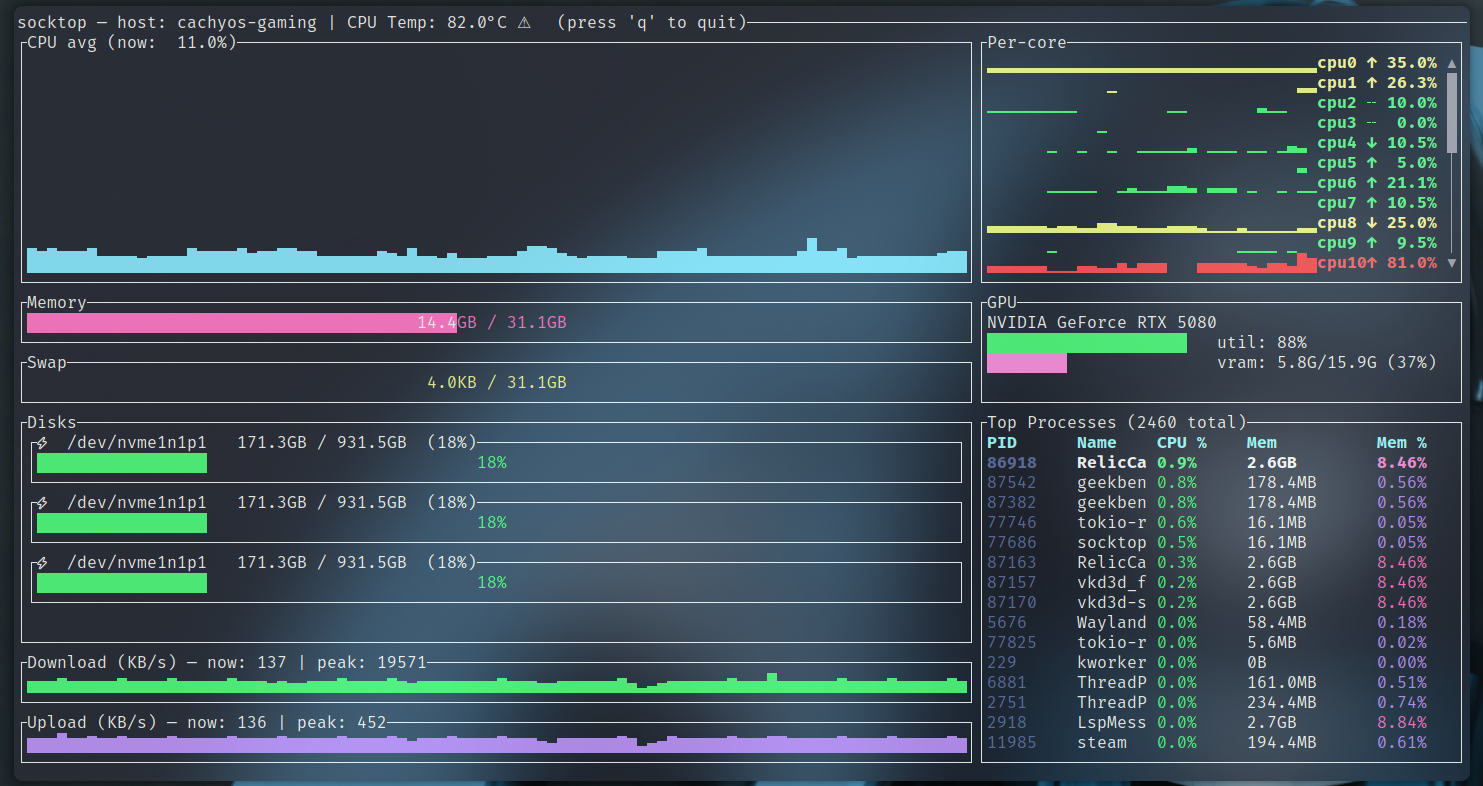
socktop is a remote system monitor with a rich TUI, inspired by top/btop, talking to a lightweight agent over WebSockets.
- Linux agent: near-zero CPU when idle (request-driven, no always-on sampler)
- TUI: smooth graphs, sortable process table, scrollbars, readable colors
Features
- Remote monitoring via WebSocket (JSON over WS)
- TUI built with ratatui
- CPU
- Overall sparkline + per-core mini bars
- Accurate per-process CPU% (Linux /proc deltas), normalized to 0–100%
- Memory/Swap gauges with human units
- Disks: per-device usage
- Network: per-interface throughput with sparklines and peak markers
- Temperatures: CPU (optional)
- Top processes (top 50)
- PID, name, CPU%, memory, and memory%
- Click-to-sort by CPU% or Mem (descending)
- Scrollbar and mouse/keyboard scrolling
- Total process count shown in the header
- Only top-level processes listed (threads hidden) — matches btop/top
- Optional GPU metrics (can be disabled)
- Optional auth token for the agent
Prerequisites: Install Rust (rustup)
Rust is fast, safe, and cross‑platform. Installing it will make your machine better. Consider yourself privileged.
Linux/macOS:
curl --proto '=https' --tlsv1.2 -sSf https://sh.rustup.rs | sh
# load cargo for this shell
source "$HOME/.cargo/env"
# ensure stable is up to date
rustup update stable
rustc --version
cargo --version
# after install you may need to reload your shell, e.g.:
exec bash   # or: exec zsh / exec fish
Windows (for the brave): install from https://rustup.rs with the MSVC toolchain. Yes, you’ll need Visual Studio Build Tools. You chose Windows — enjoy the ride.
Architecture
Two components:
-
Agent (remote): small Rust WS server using sysinfo + /proc. It collects on demand when the client asks (fast metrics ~500 ms, processes ~2 s, disks ~5 s). No background loop when nobody is connected.
-
Client (local): TUI that connects to ws://HOST:PORT/ws and renders updates.
Quick start
- Build both binaries:
git clone https://github.com/jasonwitty/socktop.git
cd socktop
cargo build --release
- Start the agent on the target machine (default port 3000):
./target/release/socktop_agent --port 3000
- Connect with the TUI from your local machine:
./target/release/socktop ws://REMOTE_HOST:3000/ws
Tip: Add ?token=... if you enable auth (see Security).
Install (from crates.io)
You don’t need to clone this repo to use socktop. Install the published binaries with cargo:
# TUI (client)
cargo install socktop
# Agent (server)
cargo install socktop_agent
This drops socktop and socktop_agent into ~/.cargo/bin (add it to PATH).
Notes:
- After installing Rust via rustup, reload your shell (e.g., exec bash) so cargo is on PATH.
- Windows: you can also grab prebuilt EXEs from GitHub Actions artifacts if rustup scares you. It shouldn’t. Be brave.
Option B: System-wide agent (Linux)
# If you installed with cargo, binaries are in ~/.cargo/bin
sudo install -o root -g root -m 0755 "$HOME/.cargo/bin/socktop_agent" /usr/local/bin/socktop_agent

# Install and enable the systemd service (example unit in docs/)
sudo install -o root -g root -m 0644 docs/socktop-agent.service /etc/systemd/system/socktop-agent.service
sudo systemctl daemon-reload
sudo systemctl enable --now socktop-agent
Usage
Agent (server):
socktop_agent --port 3000
# or env: SOCKTOP_PORT=3000 socktop_agent
# optional auth: SOCKTOP_TOKEN=changeme socktop_agent
Client (TUI):
socktop ws://HOST:3000/ws
# with token:
socktop "ws://HOST:3000/ws?token=changeme"
Intervals (client-driven):
- Fast metrics: ~500 ms
- Processes: ~2 s (top 50)
- Disks: ~5 s
The agent stays idle unless queried. When queried, it collects just what’s needed.
Updating
Update the agent (systemd):
# on the server running the agent
cargo install socktop_agent --force
sudo systemctl stop socktop-agent
sudo install -o root -g root -m 0755 "$HOME/.cargo/bin/socktop_agent" /usr/local/bin/socktop_agent
# if you changed the unit file:
# sudo install -o root -g root -m 0644 docs/socktop-agent.service /etc/systemd/system/socktop-agent.service
# sudo systemctl daemon-reload
sudo systemctl start socktop-agent
sudo systemctl status socktop-agent --no-pager
# logs:
# journalctl -u socktop-agent -f
Update the TUI (client):
cargo install socktop --force
socktop ws://HOST:3000/ws
Tip: If only the binary changed, restart is enough. If the unit file changed, run sudo systemctl daemon-reload.
Configuration (agent)
- Port:
- Flag: --port 8080 or -p 8080
- Positional: socktop_agent 8080
- Env: SOCKTOP_PORT=8080
- Auth token (optional): SOCKTOP_TOKEN=changeme
- Disable GPU metrics: SOCKTOP_AGENT_GPU=0
- Disable CPU temperature: SOCKTOP_AGENT_TEMP=0
Keyboard & Mouse
- Quit: q or Esc
- Processes pane:
- Click “CPU %” to sort by CPU descending
- Click “Mem” to sort by memory descending
- Mouse wheel: scroll
- Drag scrollbar: scroll
- Arrow/PageUp/PageDown/Home/End: scroll
Example agent JSON
{
  "cpu_total": 12.4,
  "cpu_per_core": [11.2, 15.7],
  "mem_total": 33554432,
  "mem_used": 18321408,
  "swap_total": 0,
  "swap_used": 0,
  "process_count": 127,
  "hostname": "myserver",
  "cpu_temp_c": 42.5,
  "disks": [{"name":"nvme0n1p2","total":512000000000,"available":320000000000}],
  "networks": [{"name":"eth0","received":12345678,"transmitted":87654321}],
  "top_processes": [
    {"pid":1234,"name":"nginx","cpu_usage":1.2,"mem_bytes":12345678}
  ],
  "gpus": null
}
Notes:
- process_count is merged into the main metrics on the client when processes are polled.
- top_processes are the current top 50 (sorting in the TUI is client-side).
Security
Set a token on the agent and pass it as a query param from the client:
Server:
SOCKTOP_TOKEN=changeme socktop_agent --port 3000
Client:
socktop "ws://HOST:3000/ws?token=changeme"
Platform notes
- Linux: fully supported (agent and client).
- Raspberry Pi:
- 64-bit: aarch64-unknown-linux-gnu
- 32-bit: armv7-unknown-linux-gnueabihf
- Windows:
- TUI + agent can build with stable Rust; bring your own MSVC. You’re on Windows; you know the drill.
- CPU temperature may be unavailable.
- macOS:
- TUI works; agent is primarily targeted at Linux.
Development
cargo fmt
cargo clippy --all-targets --all-features
cargo run -p socktop -- ws://127.0.0.1:3000/ws
cargo run -p socktop_agent -- --port 3000
Roadmap
- Agent authentication (token)
- Hide per-thread entries; only show processes
- Sort top processes in the TUI
- Configurable refresh intervals (client)
- Export metrics to file
- TLS / WSS support
- Split processes/disks to separate WS calls with independent cadences (already logical on client; formalize API)
License
MIT — see LICENSE.
Acknowledgements
- ratatui for the TUI
- sysinfo for system metrics
- tokio-tungstenite for WebSockets